Documentation · Beta
AudioBridge WebSocket Protocol
AudioBridge is a full-duplex audio bridge over WebSocket. On every call the switch opens a connection to your service, streams the caller's voice to you uplink and plays back to the caller the audio you send downlink.
The message format follows Twilio Media Streams (event field + nested object), with two extensions: optional binary audio transport and the A-law codec in addition to µ-law. An existing Media Streams integration migrates to AudioBridge by swapping the WebSocket endpoint.
Bridge configuration
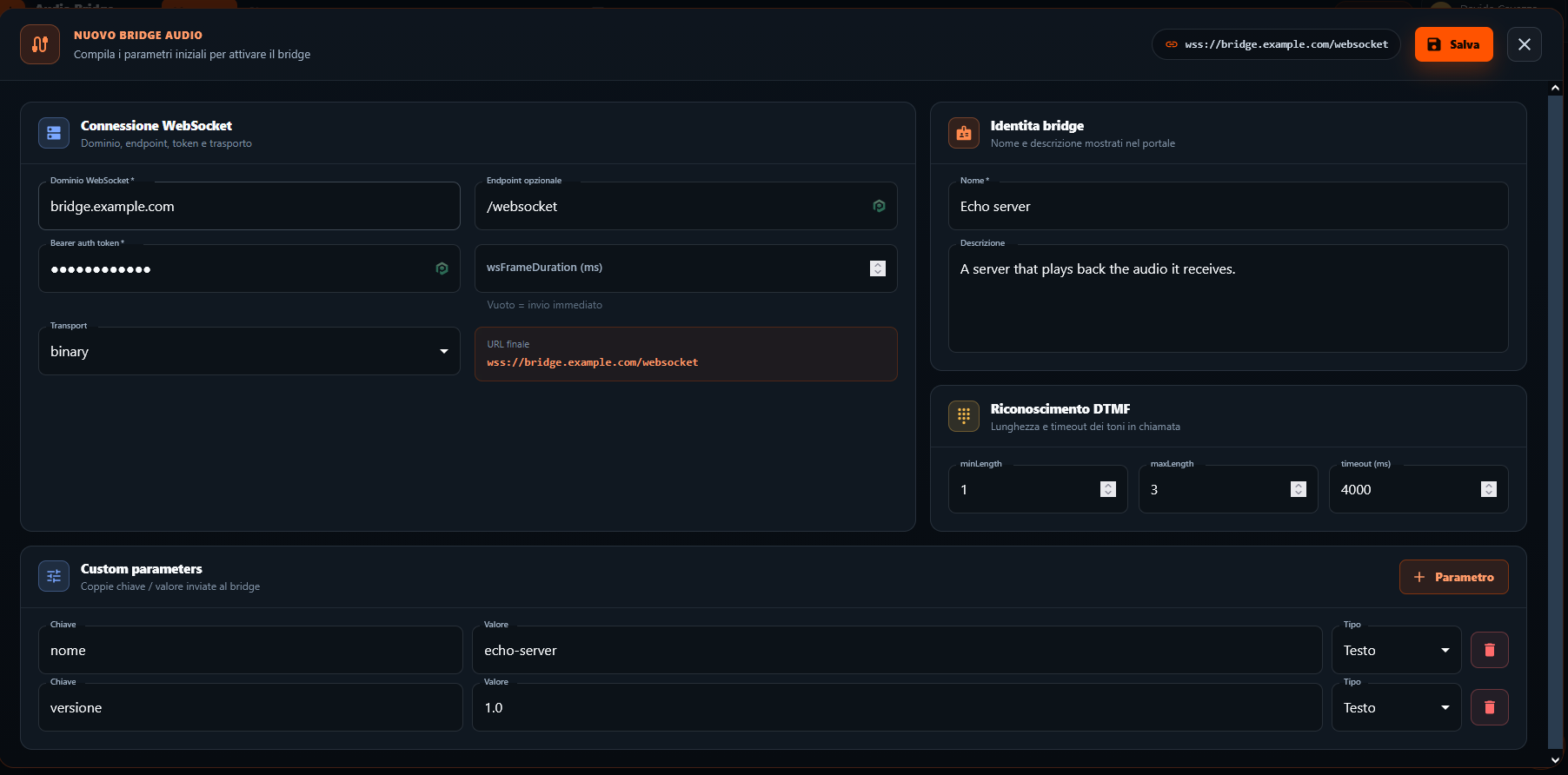
In the Bridge section of the portal open New Bridge and fill in the parameters required for activation. The form is split into sections:
- WebSocket connection — enter the WebSocket domain (e.g. bridge.example.com) and the optional Endpoint (e.g. /websocket): the portal builds the final URL wss://… for you. Pick the Transport (e.g. binary) and, if you want to aggregate the uplink audio into fixed-duration frames, the wsFrameDuration in ms, up to a maximum of 200 (if left empty, each frame is sent as soon as it is available).
- Bearer auth token — enter the token your server uses to authenticate us: we will send it in the Authorization: Bearer header on every connection.
- Bridge identity — give the bridge a Name and a Description; they are used solely to identify it in the portal.
- DTMF recognition — set minLength, maxLength and timeout (ms) for aggregating the digits pressed during the call (see the DTMF section).
- (Optional) Custom parameters — add key/value pairs (with their Type) that you will receive in the customParameters field of the start event of every call.
- Press Save: the bridge is configured and incoming calls are routed to your WebSocket.
Connecting the phone line
For calls to reach your bridge you need one or more phone numbers. You have two options:
- Get a BEEVOIP number — request a number on our network, straight from the portal.
- Connect your PBX (BYOC) — bring your own numbers and route calls from your PBX to AudioBridge.
Getting a BEEVOIP number
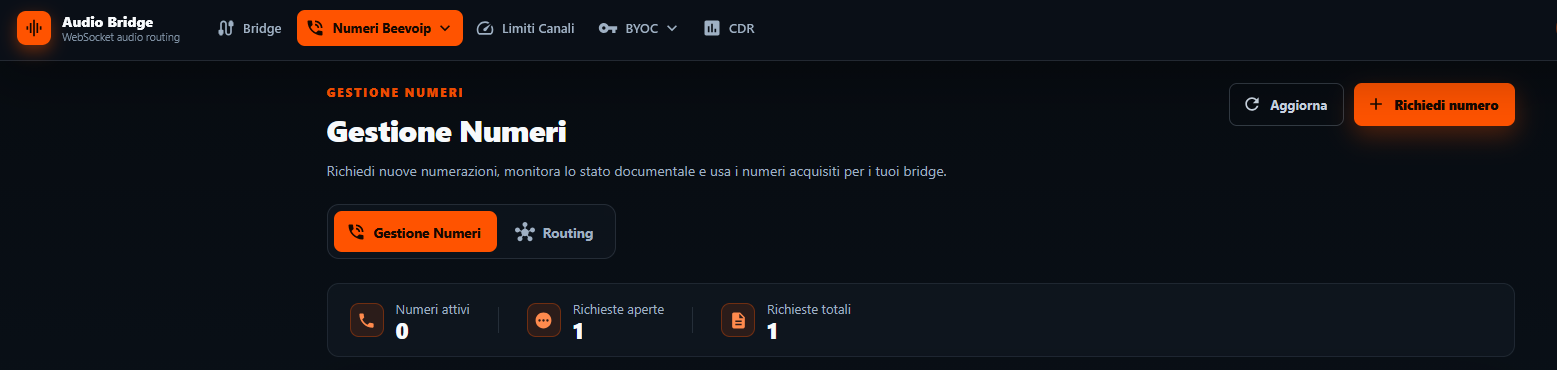
In the portal go to Beevoip Numbers › Number Management and press Request number.
The following documents are required to process the request:
- an identity document;
- a chamber of commerce registration extract;
- a company utility record showing the company name and address (e.g. a utility bill or a phone contract).
Connecting your PBX (BYOC)
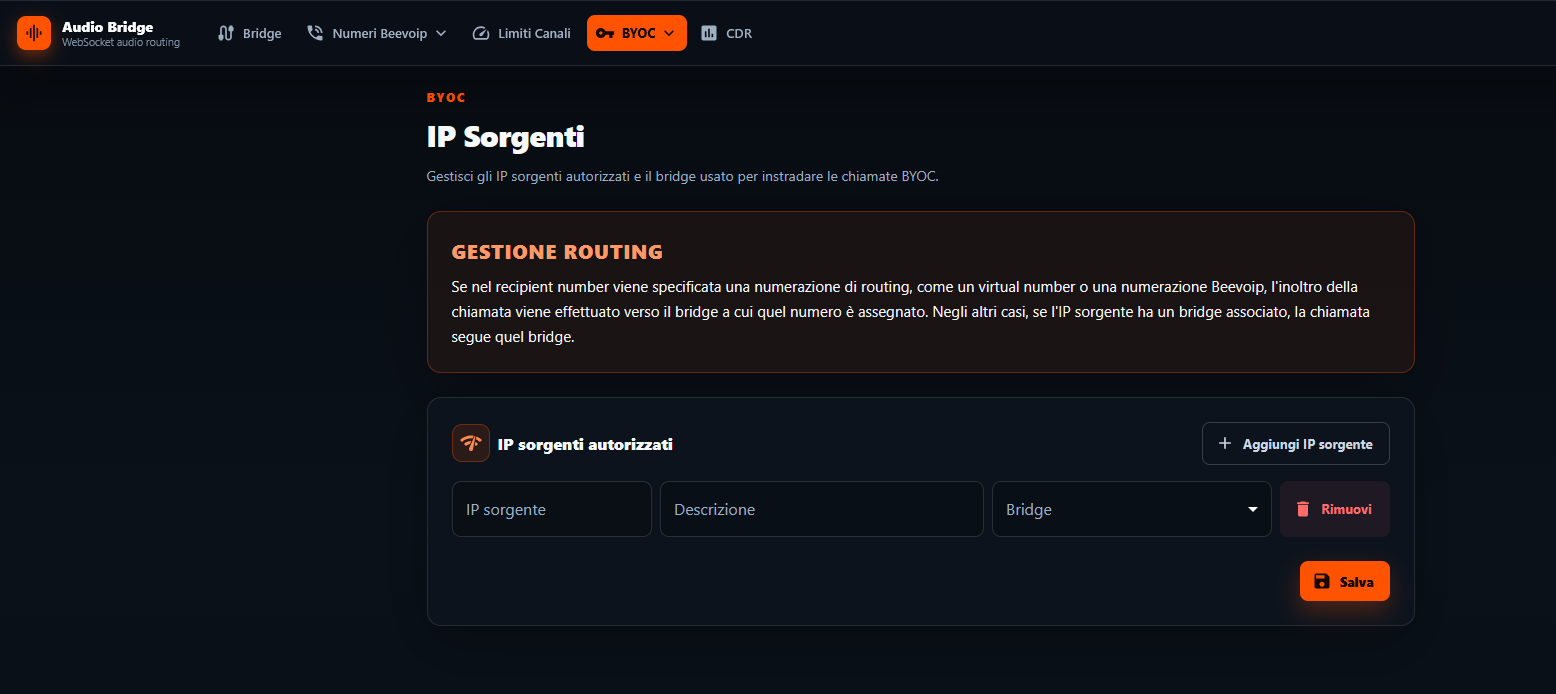
If you already have your own numbers on a PBX, go to the BYOC section. In Authorized source IPs add a row with:
- the source IP of your PBX;
- a description to identify it;
- the Bridge to connect the calls coming from that IP to.
After saving, calls coming from that IP are routed to the selected bridge.
Connection & security
AudioBridge opens the WebSocket to the endpoint configured in the portal (e.g. wss://host/audio).
- TLS — mandatory: the URL is always wss:// and the connection is encrypted. Your server must expose a valid TLS certificate.
- Token — static and mandatory: your server defines it and you enter it in the BEEVOIP portal; AudioBridge sends it in the Authorization header on every connection to authenticate itself to your server.
- Source addresses — AudioBridge connections originate from the 20.47.65.96/28 subnet: allow it on your firewall.
Audio format
- Sample rate 8000 Hz, mono, 1 byte/sample.
- Codec: A-law by default (on our numbers). On SIP trunks A-law or µ-law can be negotiated.
- PCMA → audio/x-alaw, PCMU → audio/x-mulaw.
- The audio is the raw codec bytes only, with no header: sent as-is in binary, base64-encoded in json.
Framing
The uplink is aggregated into frames of wsFrameDuration ms (default 20, maximum 200: higher values are capped at 200; at 8 kHz A-law, 20 ms is 160 bytes). Downlink frames can be any size: AudioBridge re-frames towards the phone network.
Transport: binary or json
The mode is selected per call and reported in the start.transport field. Control messages are always JSON in both modes: only the audio transport changes.
| Mode | Audio | Control |
|---|---|---|
| binary | binary WebSocket frames = raw codec bytes | JSON messages (text frames) |
| json | media event with base64 payload | JSON messages (text frames) |
The sequenceNumber field is present only in json mode.
Call lifecycle
- WebSocket open — when the call is answered, AudioBridge opens the connection to your wss:// endpoint, sending the token in the Authorization: Bearer header. Your server verifies it and accepts the connection.
- connected — json mode only: first message after the open, it confirms the connection and reports the protocol version. In binary this event is not sent.
- start — the handshake message: it contains the sessionId, caller and called numbers, mediaFormat, transport and the customParameters configured in the portal. It provides all the metadata needed to handle the call.
- Uplink audio — the caller's voice is streamed to your service: binary WebSocket frames in binary, media events with base64 payload in json. Streaming starts immediately after the start event.
- Downlink audio — in parallel (full-duplex), your service sends the audio to play to the caller, in the format defined by the selected transport.
- clear (optional) — if the caller starts speaking while a prompt is playing, your service sends clear to flush the playback buffer (barge-in) and immediately interrupt the audio in progress.
- stop — at the end of the call, AudioBridge sends the stop event with the reason (e.g. hangup): after this event no more audio is transmitted.
- WebSocket close — AudioBridge closes the connection with code 1000 (normal closure). You will then receive the end-of-call webhook, if configured.
Outbound messages (AudioBridge → your service)
connected
First message after the WebSocket opens, in json mode only: it confirms the connection and reports the protocol version. In binary it is not sent.
{ "event": "connected", "version": "1.0.0" }start
Handshake message with the session metadata and the audio format. Caller and called numbers are expressed in E.164 format (on our numbers). In json mode the message also includes "sequenceNumber": "1"; in binary (as in the example) the field is omitted.
{
  "event": "start",
  "start": {
    "sessionId": "1c2f...-call-uuid",
    "callerNumber": "+390612345678",
    "recipientNumber": "+390699999999",
    "mediaFormat": { "encoding": "audio/x-alaw", "sampleRate": 8000, "channels": 1 },
    "transport": "binary",
    "customParameters": { "cliente": "acme" }
  }
}
media (uplink, json only)
In binary mode the uplink is transmitted directly as binary WebSocket frames: this message is not sent.
{ "event": "media", "sequenceNumber": "42",
  "media": { "track": "inbound", "chunk": "41", "timestamp": "820", "payload": "<base64>" } }
Other events
| Event | Description |
|---|---|
| dtmf | digit pressed by the caller (see the DTMF section) |
| mark | confirmation of a received mark, emitted when the marked point has been played (or immediately, if a clear discarded the queued audio) |
| stop | sent before the WebSocket closes: { "stop": { "reason": "hangup" } } |
| error | { "error": { "code": "...", "message": "..." } } |
Inbound messages (your service → AudioBridge)
Downlink audio
- binary: binary WebSocket frames, played to the caller with no transformation.
- json:
mediaevent with track: "outbound" and base64 payload.
{ "event": "media", "media": { "track": "outbound", "payload": "<base64>" } }clear (barge-in)
Flushes the playback buffer: lets you interrupt a prompt in progress when the caller starts speaking.
{ "event": "clear" }mark
Places a marker in the playback stream; AudioBridge replies with an outbound
mark event when playback reaches that point. If a clear
flushes the buffer before the marked point is reached, the queued marks are
still confirmed immediately: the echo does not distinguish between audio that was played and audio
discarded by the clear (same semantics as Twilio Media Streams).
{ "event": "mark", "mark": { "name": "prompt-1" } }The outbound echo has the same format, with the same name (and the sequenceNumber in json mode):
{ "event": "mark", "sequenceNumber": "60", "mark": { "name": "prompt-1" } }DTMF
The dtmf event is generated for each digit pressed by the caller. The delivery mode is configured in the portal, in the DTMF recognition section of the Bridge configuration. You can receive it in two modes:
- Per digit — one event for each digit pressed:
{ "event": "dtmf", "dtmf": { "digits": "5" } } - Aggregated by length/timeout — with minLength, maxLength and timeout: a single event when the number of digits falls within the configured range and the timeout expires.
Call transfer
Your service hands over control of the call by sending the redirect command on the WebSocket. The method field selects how the call is delivered to the destination given in extension:
{ "event": "redirect", "extension": "xxx", "method": "refer" }| Field | Type | Description |
|---|---|---|
| extension | string, required | transfer destination: the extension to reach with refer, the called number with forward |
| method | string, optional | "refer" or "forward". If absent or undefined, "refer" is applied |
method: "refer" (default)
AudioBridge releases the call to the SIP trunk it came from, indicating the specified extension as the destination: it is therefore your PBX that routes the call to that extension. Since the transfer is delegated to the SIP peer, this mode can be used only when AudioBridge sits on a trunk (BYOC scenario): on Beevoip numbers there is no PBX to release the call to. The destination is a trunk extension, not a public-network number, and the transfer generates no billed traffic.
method: "forward"
AudioBridge routes the call out to the public network towards the given number: the destination can only be a mobile number and it can be done only on inbound calls on BEEVOIP numbers. The outbound leg is in every respect an outbound call and is billed as outbound traffic, according to the rate plan applied to the destination.
Call end & webhook
At the end of the call AudioBridge sends a POST request to the endpoint you have configured, with an application/json body:
{
  "sessionId": "1c2f...-call-uuid",
  "durationSecs": 128,
  "reason": "hangup"
}
sessionId matches the one in the start event; reason carries the cause from the stop event, useful for reporting.
Recording
AudioBridge keeps no call audio. Since your service receives the entire full-duplex stream on the WebSocket, you can record the conversation on your side (frames are A-law at 8 kHz).
Keep-alive & closing
- AudioBridge sends a ping at regular intervals of pingIntervalMs; if the reply pong does not arrive within pongTimeoutMs, the connection is considered inactive and is closed. Standard-compliant WebSocket implementations answer pings automatically, with no action required from your service.
- On closing, AudioBridge first transmits the stop event, carrying the termination reason, and then closes the WebSocket with code 1000. The reason is reported exclusively in the
stopevent and not in the close code.
Billing
- Inbound and streaming — per-minute billing, prepaid.
- Outbound (including transfers to external numbers) — per-second billing.
The full price list is available on the pricing page.